
Zad Archery Controls
Mouse lane, Arrow Fall, inventory chords, and the settings that launch week got wrong.
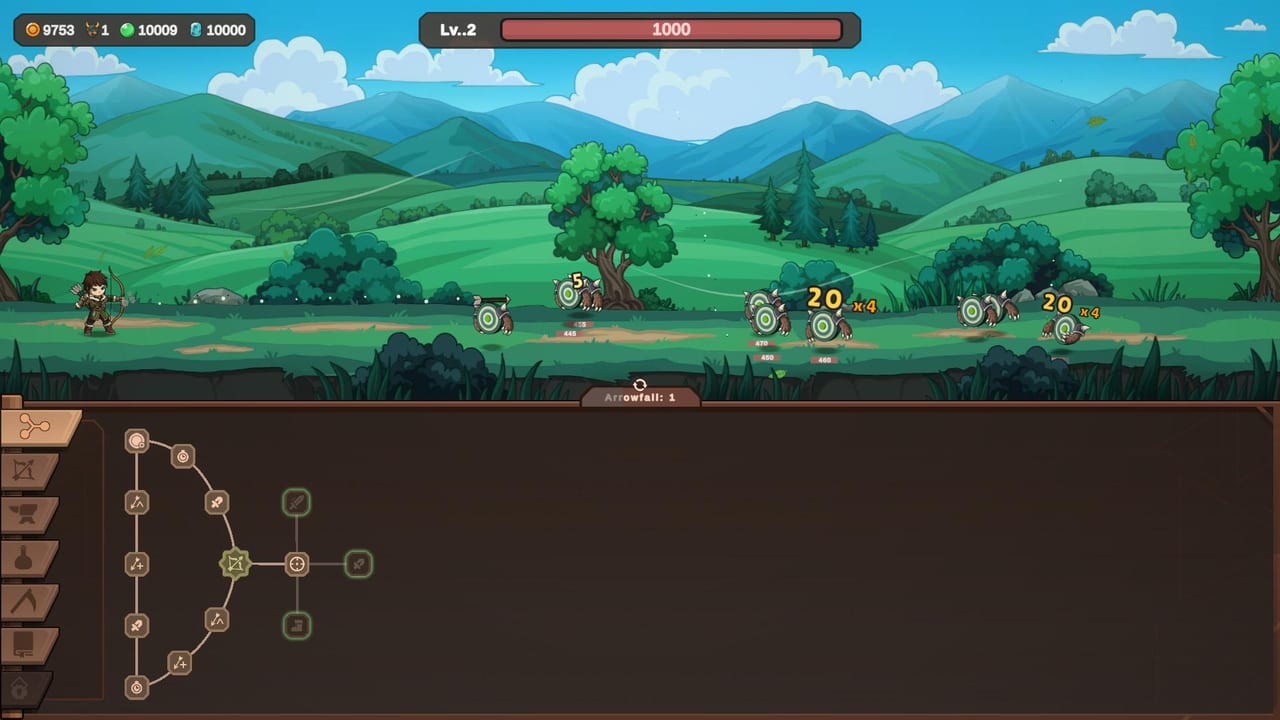
Zad Archery is built as a mouse-first incremental. Steam lists a Mouse Only accessibility option, custom volume sliders, and Steam Deck as Playable. You will not need a hotbar of twenty keys. You will need to know which click does damage, which click equips, and which chord vendors a Rare you meant to wear.
This page is the control reference that the beginner guide assumes you have open in a second window.
Combat strip
The top half of the screen is always the lane:
- Move the mouse to walk the archer along the grass. Early Archer shots fire while you stand; Sniper is the job that explicitly lets you attack while moving (see jobs).
- Left-click empty ground or a monster clump to spend an Arrow Fall charge. The charge count sits in a small label under the grass, usually written Arrowfall: 1 until the skill tree adds more.
- Auto-attacks fire on their own. You are not drawing a bow with a hold-to-charge minigame.
- The red bar at the top is the wave HP. Your personal HP, when it matters, shows on equipped armor cards rather than as a giant player heart bar.
If Arrow Fall feels like it does nothing, you are either on cooldown, out of charges, or clicking the UI tray instead of the grass. The tray eats clicks. Aim at the hillside.
Inventory chords (read the item card)
Every loot card in the crafting and inventory flow prints the same two lines:
- Right Click to Equip
- CTRL + SHIFT + Right Click to Sell for [gold]
That is official UI copy, not a community bind. The itch.io HTML5 demo made this worse because browsers already own right-click and some players reported Ctrl+Shift sticking, which turned every right-click into a sell. On Steam the chords still exist, so:
- Hover the item.
- Read rarity, HP, gold-gain, and Arrow Fall projectile rolls.
- Right-click once to equip.
- Only hold Ctrl+Shift when you are sure the roll is trash.
If you accidentally sold a Rare with +1 Arrowfall Projectile, that is a crafting problem, not a hidden undo. There is no confirmed mail recovery.
Left-hand tabs are not keybinds
The brown tray on the left is mouse-only. From top to bottom you will see, as they unlock:
- Skill tree (node graph)
- Jobs / bow skills
- Crafting anvil
- Alchemy flask
- Gathering pickaxe (Herbalism, Mining, Fishing)
- Additional late tabs for cards or collection
- Settings gear
Tablet and itch demo players complained the tray was cropped, so they thought Mining did not exist. On a desktop window, leave the game fullscreen or use the native resolution option so the pickaxe icon stays visible. The mining guide is literally that tab.
Settings that matter
Patch 1.0.2 added your screen’s own resolution as the first entry in the list. If the lane looks zoomed, the skill tree is clipped, or UI buttons sit off-canvas, open Settings and pick that first row before you touch anything else.
Volume is split (Steam lists custom volume controls). Mute music if you are farming wave 40 for twenty minutes; keep SFX on so Arrow Fall and orb hits still confirm.
There is no confirmed full rebind screen in 1.0. Play with a mouse. Steam Deck Playable means the clicker loop works with a trackpad or community layout, not that Samharia shipped a unique Deck UI.
Accessibility and platform notes
- Mouse Only option: you can clear the campaign without a keyboard except for the sell chord. If you refuse to use Ctrl+Shift, vendor from the crafting Failed/Take Item flow instead of the chord when possible.
- Family Sharing and Steam Cloud are on the store page. Cloud is why you should restart after the Guardian fix rather than keep a broken local state.
- The HTML5 itch build is a demo. Do not learn selling there and expect the same browser quirks on Steam.
Once the clicks are muscle memory, go back to Getting Started for spend order, or skip ahead to Guardians if you already died to the fifth Guardian and need the restart rule. Rankings for what to click toward live on the tier list.
Frequently Asked Questions
Quick answers to the most common Zad Archery questions.
How do I use Arrow Fall?
Left-click the grass or a monster clump. Charges are listed under the lane. The skill tree adds charges and can automate the cast.
How do I equip or sell loot?
Right-click equips. Ctrl+Shift+right-click sells. The item card prints both chords. Read rolls before you vendor, especially Arrow Fall projectiles.
The left tabs are missing on my screen.
The window is cropped. Patch 1.0.2 puts native resolution first in Settings. Fullscreen on desktop; do not play the itch demo zoomed on a tablet and assume Steam is broken.
Is there a controller layout?
Steam Deck is Playable and the game is mouse-only friendly. There is no separate co-op pad scheme because the game is single-player.